


Updated November 2026
Short answer: Card, Apple Pay and Google Pay add a processing fee, usually 3 to 6%, set by the payment processor and your card and currency. Revolut and stablecoins have a 0% fee on Packsify. Pay with Revolut in the currency shown at checkout, or with USDC on Solana if you don't have Revolut. We don't take PayPal.
Same credits, same packs, same price per credit. The only thing that changes is the fee on top. Here is what each way of paying costs you, what works best in the US, the EU and everywhere else, and what to do if you were looking for PayPal.
What you pay with each method
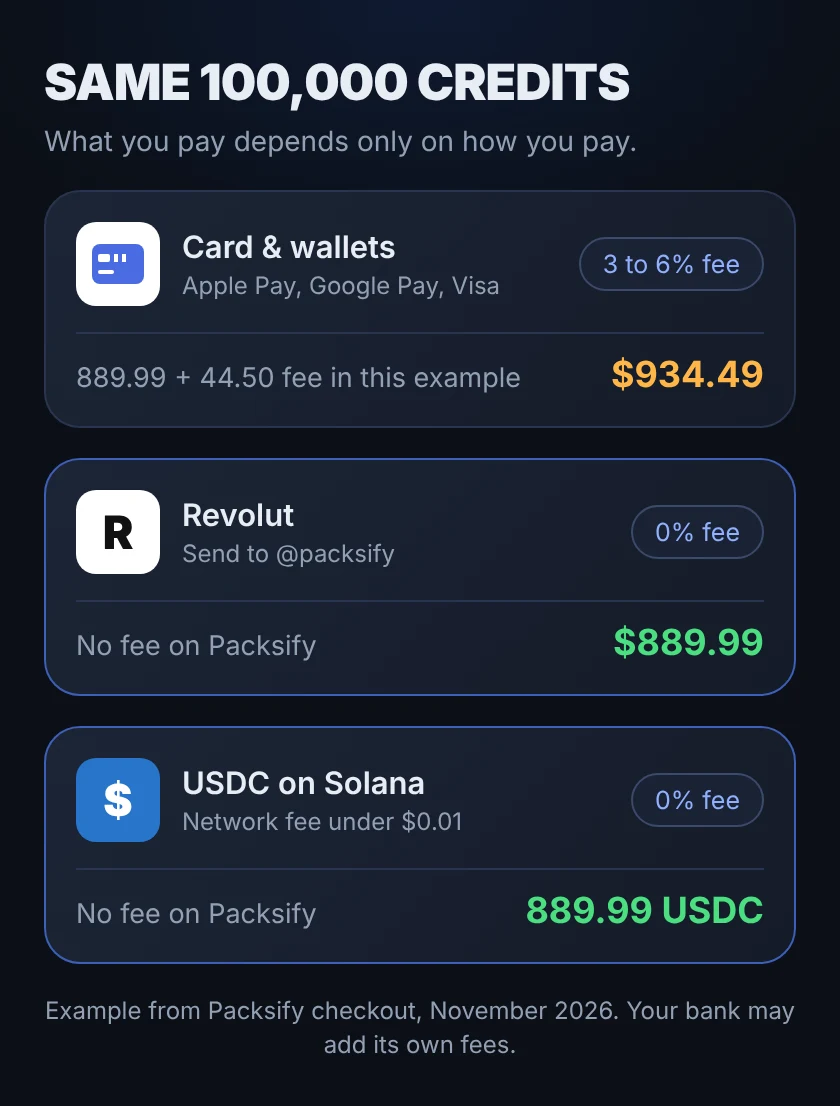
Example from our checkout: 100,000 credits, 889.99 USD.
| Payment method | Fee on Packsify | You pay |
|---|---|---|
| Card, Apple Pay, Google Pay | usually 3 to 6% (44.50 USD in this example) | 934.49 USD |
| Revolut | 0% (your bank may still add FX fees) | 889.99 USD |
| USDT or USDC | 0% | 889.99 USDT or USDC, plus a small network fee |
The card fee is set by the payment processor and depends on your card, your currency and the conversion. You always see the exact fee at checkout before you pay. Your own bank can add exchange or foreign card fees on top. If you top up often, that fee adds up fast.
How to pay with Revolut
- In the Packsify app, go to Credits and tap Buy Credits.
- Pick your amount and choose Revolut.
- Check the amount and currency at checkout and copy our Revtag: @packsify.
- Open your Revolut app and send exactly that amount, in exactly that currency.
- Take a screenshot of the payment, attach it in Packsify and confirm.
A person from our team checks the payment and adds your credits, usually within 5 to 10 minutes.
Tips to keep Revolut at zero fees
Packsify adds no fee on Revolut. Your own bank can still add exchange fees if money gets converted, so these tips keep that part at zero too.
- Pick your own currency at checkout. The Buy Credits screen has a currency menu. If your Revolut money is in EUR, pick EUR and send EUR. Then nothing gets converted.
- Never convert it yourself. Send the exact currency shown. A different currency or amount means a manual check or a partial refund, and your credits come later.
- Avoid weekend exchanges. On Revolut's US Standard plan, exchanging money on a weekend adds a 1% fee. If you need to exchange, do it on a weekday.
- Know your plan's exchange allowance. On Revolut's US Standard plan, exchange at Revolut's normal rate is covered up to 1,000 USD a month. Above that a fee applies. Paying in the currency you already hold avoids this completely.
- Fund Revolut by bank transfer. Adding money by bank transfer is usually free, but check your plan in the Revolut app. Card top-ups into Revolut can carry a fee.
What works best where you live
EU and UK
Revolut is the easy pick. Choose EUR or GBP at checkout, send the same currency from Revolut, done. It is usually the most used way to pay on Packsify.
United States
Revolut has US accounts too, and transfers between Revolut users arrive in seconds with no transfer fee. At checkout, copy our Revtag @packsify and send the exact USD amount from your Revolut app. If your app can't find @packsify, use USDC instead.
If you don't use Revolut, USDC is the next best option: on Coinbase you can turn USD into USDC with no fee and send it on Solana, usually for less than a cent. Adding USD by ACH is free but takes 3 to 5 business days, so plan ahead. The stablecoin guide shows every step.
One more thing for US and Canadian players: when you buy inside the game, Apple or Google add sales tax on top of the price, in most US states 4 to 10% and in Canada 5 to 15%. On Packsify, checkout shows that tax as covered by us.
Everywhere else
If Revolut isn't available in your country, use USDT or USDC. They work almost everywhere, the network fee on Solana is under one cent, and Packsify adds no fee. Start with the stablecoin guide.
Looking for PayPal?
We don't take PayPal at the moment. If you liked PayPal because it is fast and lives on your phone, Revolut is the closest thing: transfers usually arrive in seconds, and it is 0% fee on Packsify.
In the US, PayPal can fund a few crypto wallets, but it adds at least 1% on top and doesn't send USDC directly. Getting USDC through Coinbase costs less.
Mistakes that slow your credits down
- Sending a different currency than the one at checkout.
- Sending a different amount, for example rounding up or down.
- Forgetting to attach the screenshot of the payment.
- Sending crypto on a different network than the one you picked.
If any of these happened, message us in the app chat with your screenshot before you do anything else, and don't place a new order until the payment is confirmed.
Which one to pick
| Your situation | Best way to pay |
|---|---|
| You have Revolut | Revolut, in the currency you already hold |
| No Revolut, ready for a short setup | USDC on Solana |
| You already hold USDT on TRON | USDT on TRC20, about 1 to 2 USDT network fee |
| One small order and you want it done now | Card or Apple Pay, the fee is shown before you pay |
Where Packsify fits
Packsify buys the exact packs you pick through the official Apple App Store or Google Play, usually with between 10 and 30% more pack value for the same budget. Paying with Revolut or stablecoins keeps the fee part at zero, so more of your budget ends up in the game.
Open Packsify and check your price
More on paying: how to pay with USDC or USDT and every payment method on Packsify.
Sources: Packsify checkout (November 2026), Revolut US fee pages, PayPal help center, checked November 2026.
Spotted a mistake? Tell us in the Play Smarter Discord and we will fix it.

FAQ
Does Packsify take PayPal?⌄
How much is the card fee on Packsify?⌄
How long does a Revolut payment take?⌄